Managing a Plex server with media files hosted on a remote NAS
At home, I’ve got this NAS server taking care of all my media goodies. It’s a Synology DS414j. If you are a connoisseur, you probably already know it consists of a 4-bay drive. Released in 2014, and the “j” stands for low-cost. Featuring 512MB of RAM and a dual-core CPU clocked at 1.2GHz, it’s sufficient for “typical NAS chores”, even still today. But toss in a Plex server, and it’s a whole different ball game.
I host the Plex server, among other things, on another machine as a conscientious hobbyist. We’re talking about an Intel NUC with an 8th gen i5 CPU and 32GB of RAM. It’s powerful, small, quiet, and easy on the electricity bill. There’s just one minor challenge: The movies & series data remain in the NAS!
Mounting over NFS
There is absolutely no chance I’m transferring the 4TB volume from the NAS to the NUC server—physically speaking. So I opt for a local network mount, especially since my local network setup boasts a gigabit link between them.
Swiftly, I configure the NFS sharing permissions in the Synology OS, and write an fstab entry to mount the NAS volume on the Plex server host machine.
And it’s been running smoothly ever since.
The issue
Well, there’s a hitch in the plan. Otherwise, why would I bother writing this blog post?
This setup falls flat whenever the NUC server reboots.
Checking the logs, Plex starts before the completion of the NFS mount, causing all movies and series to be marked as unavailable.
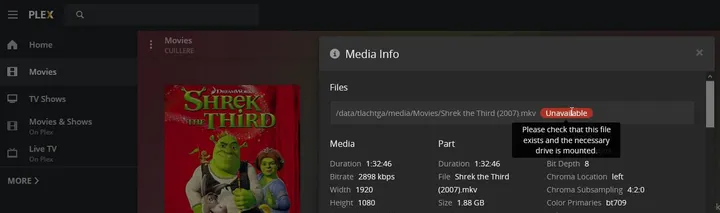
It’s kinda fun; Plex actually handles it just fine if the NFS mount drops for a minute and then reconnects. I’ve witnessed it a couple of times! Because I have a Wi-Fi 6 mesh connecting the two devices—it’s not the smartest setup, but I have my reasons that logic can’t explain.
However, during the boot sequence, Plex just flags the files as unavailable and calls it a day. Sure, the NFS mount completes a few seconds later, but Plex remains oblivious.
Every time the machine reboots—whether it’s me or Ubuntu’s unattended-upgrades doing it—I have to SSH into the machine and restart Plex to set things right.

At some point, I really wanted to fix this. Let’s walk through a few resolution attempts and how I eventually solved this issue (spoiler: it’s both funny and stupid).
Tech context
Let’s cut to the chase, but some details are essential for what follows.
- Plex runs via Docker + docker-compose on an Ubuntu host.
- The Docker container’s
restart-policyis set tounless-stopped, so it boots right after the systemddocker.service.
- The Docker container’s
- The media folder is mounted using both
fstaband NFS.
Initial investigation
systemd runs the nfs.mount service before docker.service according to the dependencies and logs. Yet, googling around, the nfs.mount is not blocking the boot sequence. Just as well, because an unreachable remote host could take a minute to timeout. And I confirmed it, booting the machine with the NAS turned off, the boot duration remains unaffected.
The NFS mount command takes around 1 second. Sometimes faster, and Plex actually manages to boot up just fine—let’s say it happens 1 in 10 times.
We’ve clearly got ourselves a race condition.
1st try: Delay the start of the docker service
I try to solve the race condition by delaying the docker.service. I’m fine with this idea.
nano /lib/systemd/system/docker.serviceYeah I’m using nano—I don’t take my sysadmin hat too seriously.
...
[Service]
Type=notify

ExecStart=/usr/bin/dockerd -H fd:// --containerd=/run/containerd/containerd.sock
ExecReload=/bin/kill -s HUP $MAINPID
TimeoutSec=0
RestartSec=2
Restart=always

# My attempt to delay the docker service.
ExecStartPre=-/bin/sleep 180
...
I add a sleep before the execution of the docker service with ExecStartPre, a hefty 180 seconds, just to make sure the change is noticeable.
And this move was ridiculous: I just put a sleep in the boot sequence. Plex starts later, and so does the fstab mounting. However, it seems to show that fstab mounts my volume AFTER the docker service has initialized.
2nd try: Tweak the systemd dependencies
If I can’t delay the boot of Plex over the fstab jobs, can I adapt the boot order instead?
The systemd After option defines the dependencies, that’s exactly what we need.
So I try to add another dependency following this StackExchange thread set-systemd-service-to-execute-after-fstab-mount.
# This command is used to find out the service name generated out of the fstab entry.
systemctl list-units --type=mount | grep nas
#> srv-plex-data-nas-media.mount
nano /lib/systemd/system/docker.service
[Unit]
Description=Docker Application Container Engine
Documentation=https://docs.docker.com
BindsTo=containerd.service
After=network-online.target firewalld.service containerd.service srv-plex-data-nas-media.mount # Adding my systemctl `unit` here.
Wants=network-online.target
Requires=docker.socket
...And I don’t see any improvement. At this point, I shelved the subject for a few months.
3rd try: Delay the Plex container boot from the docker-compose
I ended up looking at several things to hack around the Docker or docker-compose layers.
- Is there a way to delay container startup to support dependant services with a longer startup time -> messy, no clear solution.
- docker-compose-wait -> nice but not scoped for mount!
- And it has this issue: What about wait for existence of a file? -> damn, that’s what I need, but too lazy to code it. UPDATE: LOL, this was implemented later on, in mid 2021. Did I draft this in early 2021 and only finish writing it two years later? Maybe.
- Docker Compose Healthcheck -> Awesome, as long as everything is dockerized, and my fstab part is not.
4th and final try: Mount the NFS volume via docker-compose
And then, I was like:

Why didn’t this cross my mind? Why don’t I mount the NFS volume via docker-compose? Could it actually be that easy?
TLDR: It works perfectly. And having everything wrapped up in a single docker-compose.yml file is a dream come true because I hate having to sysadmin my machines.
services:
  plex:
    container_name: plex
    image: plexinc/pms-docker:latest
    restart: unless-stopped
    environment:
      - TZ=Europe/Paris
      - PLEX_CLAIM=claim-xxxxxxxxxxxxxxxxxxxx
      - VERSION=docker
    network_mode: host
    volumes:
      - /srv/plex/config:/config
      - /srv/plex/transcode:/transcode # Shared RAM disk for transcoding.
      - nas-plex:/data/plex

volumes:
  nas-plex:
    driver_opts:
      type: 'nfs'
      o: 'addr=192.168.1.10,ro,nfsvers=4.1'
      device: ':/volume1/plex'
The whole fix is the volumes block at the bottom. Docker mounts the share itself when the container starts, so there is no fstab entry left to race against and nothing to order in systemd. ro because Plex has no business writing to the library.